
Target Shopping Trip
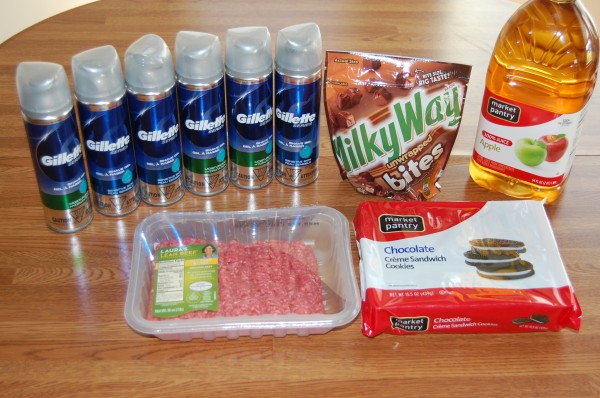
1 Milky Way Bites – $2.66, used $1/1 Target Mobile coupon AND $1/1 coupon from the 7/28 RedPlum insert – $0.66 after coupons
1 Market Pantry Cookies – $1.63, used $1/1 Target Mobile coupon – $0.63 after coupon
1 Market Pantry Juice – $1.89, used $1/1 Target Mobile coupon – $0.89 after coupon
1 Laura’s Lean Ground Beef – $4.89, used $1/1 printable AND $1/1 Target Mobile coupon (text FRESH to 827438 – expires 8/31!) – $2.89 after coupons
6 Gillette Shave Gel – $1.99 each, used 2 $6/3 coupon from the 8/11 RedPlum insert – Free after coupons
Total before coupons: $18.40
Total with tax ($1.36) after coupons and sales: $6.37

Q&A Tuesday: Advice for a first-time mom?

I’m pregnant with my first child (just found out yesterday) and I really don’t know the next step. What do I need to eat, when to start buying clothes, diapers for the baby to save money, how to prepare for the baby, child care, what are the essential things to have for the baby, how much will a baby cost, how many clothes does a baby need, how many diapers they need, etc. I’m overwhelmed. Can you please help me find answers? -Uma
Congratulations, Uma! What an exciting time!
One wonderful thing about pregnancy is that it’s nine months long (give or take a few days or weeks). While sometimes it seems like a very long time — especially during the last few months! — it can also be a blessing because it gives you time to prepare for having a baby.
Take a Deep Breath
So my biggest piece of advice would be to take a deep breath and don’t stress over things in the future. You can only live this moment right now, today. Worrying about tomorrow or eight months from now (or three years from now!) won’t change or help anything.
Find a Good Care Provider
Find a good care provider, be that a midwife or doctor. They will be able to answer many of your questions on what you should be eating and all your other pregnancy-related questions. I’d encourage you to look for a care provider who you feel like really cares about you, listens to you, and connects with you. This can make such a huge difference during your pregnancy and delivery!
What Baby Really Needs
Since I’m all about keeping it simple, we didn’t have a lot of non-necessities. In fact, here’s my list of baby must-haves:
–Clothes (For starting out, I think you can get by just fine with around six onesies, six sleepers, a few pair of socks, a few hats, and 4-6 blankets.)
–Bed
–Car seat
–Stroller
–Diapers/wipes (either cloth or disposable)
(And if you are unable to nurse–as I know happens on occasion, or if you are adopting, you would also need to add formula to this list.)
**For more on baby essentials, read this post.
If someone is planning a baby shower for you, there’s a good chance that you’ll get most of these things on this list. We were blessed to be given three different baby showers with our first. As a result, we didn’t even up buying anything but one or two items!
Diaper Stockpiling
I’d recommend starting to watch for diaper and wipe sales now — especially if you’re not planning to cloth diaper. If you find a great deal ($5 per package or less) and you have the wiggle room in your budget, go ahead and buy them. (For a good gauge on how many diapers to buy in which sizes, read this post.)
However, be sure to tape the receipt to the outside of the package. Not all brands work for all babies and all babies grow a different rates, so you may need to return some of the packages and if they have the receipts taped to the outside, it makes it extremely easy to make the return/exchange!
The Best Gift You Can Give Your Baby
Each and every baby is different, but the best gift you can give every child is love and nurturing. When I was pregnant with our first daughter, Kathrynne, we didn’t have money to buy basically anything since we were living on our beans and rice law school budget.
Even though Kathrynne had a very simple wardrobe and few things, it didn’t seem to hurt her in the least. We loved her, cherished her, talked to her, spent time with her, read to her, laughed with her, listened to her… and she’s now grown into a very active, athletic 8-year-old who excels in school (especially history, science, math, and reading) and can engineer all sorts of amazing things with a simple set of LEGOs.
I don’t know what the future holds for her, but her humble beginnings haven’t seemed to hold her back at all. And I think it truly exemplifies the truth that love and nurturing go far, even when your pocketbook is nearly empty. 🙂
For more advice and ideas, be sure to read my series on Having a Baby Without Breaking the Bank.
What advice, suggestions, tips, and encouragement do the rest of you have for Uma?
Gretchen’s Walgreens Shopping Trip: $33 worth of products for $8.58 out of pocket

Walgreens Shopping Trip
Transaction #1
1 (2 pk) Reach Toothbrushes – $2.99
Used $2/1 printable
Total with tax ($0.21): $1.02, Received $2 Register Rewards
Transaction #2
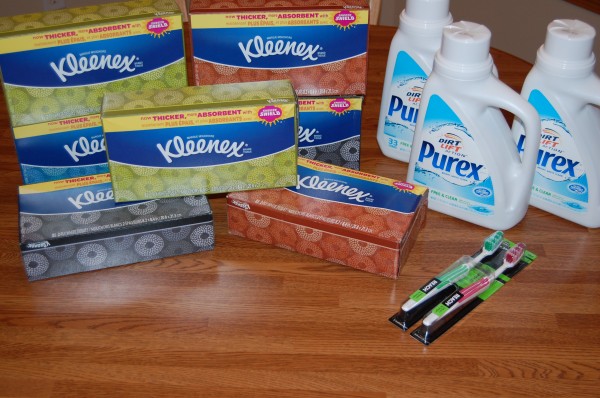
7 Kleenex Tissue – $0.99 each
Used 2 $0.50/3 coupon from the 8/11 SmartSource insert
And used $2 Register Rewards from transaction #1
Total with tax ($0.50): $4.43, Received $2 Register Rewards
Transaction #3
3 Purex Laundry Detergent at $4.79 – On Sale Buy 1 Get 2 Free
There was a $1/2 coupon from the 8/4 RedPlum insert but I didn’t have it.
Used $2 Register Rewards
Total with tax ($0.34): $3.13
Total for all transactions before coupons, sales and Register Rewards: $33.11
Total for all transactions after coupons, sales and Register Rewards: $8.58
Stop Trying to Make Yourself Happy & Start Focusing on Making a Difference

Recently, I finished The Charge by Brendan Burchard and while I didn’t love that there was a lot of language in the book (call me a prude, but I don’t think you ever need to use four-letter words to make a point!), I found some of the parts really inspiring.
I especially loved this quote:
“You want to change? Then do not, under any circumstances, allow yourself to settle on a vision or a calling or a simple change in any arena that is uninspiring. If you’re going to have clarity on something in your life, make it something so big and bright and shiny that you will get out of bed and chase it until you grasp it or die. Bring forth a desire that knows no safe boundaries and even scares you a little bit, that will demand all the best that is in you, that takes you out of your own orbit and onto new and unfamiliar ground. That kind of desire changes your life, and it changes the world.”
What are your goals in life? Are you thinking long-term or just trying to live through the next hour? If your goal is just to survive, that’s probably not going to give you a lot of excitement about life nor fuel much passion for existence.
If you want to live an amazingly fulfilling life, you must live for something bigger than yourself. Stop trying to make yourself happy or comfortable and start focusing on making a difference in someone else’s life.
When I started living for bigger things than just the moment, it completely changed my drive and enthusiasm for life. Here are my current long-term ambitions for living:
- Nurture a vibrant relationship with the Lord.
- Invest time and effort into my marriage in order that it would be strong, thriving, and last for the long haul.
- Raise children of character who will grow up to be world-changers.
- Challenge families to get their finances in order so they can be generous givers.
- Inspire women to live with intention and purpose.
Will I see all of these things to completion in my lifetime? Only God knows. But I do know that investing my life into things that matter makes every day worth waking up for.
You only get one shot at life. Don’t waste it!
Reader Tip: We’re saving $225 per year by packing a lunch!

Ilyssa emailed in the following tip:
Since it’s back-to-school time, people are probably thinking a lot about the added expenses of going to school. I’ve found that one of the largest expenses is school lunches.
My children’s school charges $2.75 a day for lunch. That works out to be about $495 each school year (per child).
Since I’ve never been pleased with the school lunch options (a typical week at my child’s school looks like this: tacos, pizza, spaghetti, grilled cheese, nachos… ugh!), I decided to make sure my kids had a healthy, delicious lunch packed for them each day. It takes a little extra time each evening, but it’s worth it!
Entrees:
– Homemade pizza. An entire cheese pizza can be made for about $5. A slice in the lunchbox would cost about $0.60.
– Quiche Cup: (Can be made in a cupcake tin) A dozen eggs and a brick of cheese can make 12 quiche cups. The cost per cup is about $0.30.
– PB&J Sandwich: Costs about $0.35 to make at home.Sides:
Organic baby carrots go on sale at my grocery store for $0.49 a bag. They run this sale about once a month. I always stock up, because one bag lasts me a week. That’s only $0.10 a day! It’s a perfect side item in the lunchbox!
Crackers can be found for about $2 a box (without coupons). One box should last about 2 weeks. That’s only $0.20 a day. Cheese bricks often go on sale for $2. You could slice it up and add it to the crackers. One 8 oz brick lasts me about one week. Only $0.40
a day.Yogurt easily found on sale for $0.50 each.
You can easily put together a combination of these items for $1.50. And you can search through your stockpile to find items that might be even cheaper. At $1.50 a day, you’ll save $225 over the course of the school year. -Illyssa
Do It Yourself: Self-Hardening Clay
RedflyCreations.com shows you how to make homemade self-hardening clay.
Do you have a fun and frugal DIY idea to share? I’d love to hear about it! Read the submission guidelines and submit it here.

Monthly Sponsor Spotlight: An interview with SmarterBucks®
We’re excited to have SmarterBucks® as one of our monthly sponsors in August.
I had the opportunity to interview them and get to know their company a little more recently:
1. Tell us about the history of your company.
SmarterBucks® was launched in 2012 by the same team behind SimpleTuition. Since 2006, SimpleTuition has helped over 20 million students and families better afford their college education.
Now, with SmarterBucks®, we are empowering them, and the one in five households in America living with student debt, with the tools and information needed to be smarter about their student debt management. Our rewards program is built around the power of interest: for every dollar you earn in SmarterBucks® that gets contributed toward your student loan debt, you save that dollar plus interest over the life of your loan. It’s that exponential effect that makes the SmarterBucks® rewards program so powerful, and enables us to help our users crush their student debt faster and for less.
2. What product or service does your company offer?
SmarterBucks® is a rewards program that helps its users pay down their student loans. To earn rewards, members currently have four options:
- Shopping in our online rewards marketplace featuring hundreds of leading retailers like Target, Walmart, Groupon, J.Crew, and more
- Inviting family and friends to make contributions or earn rewards on their behalf
- Using their SmarterBank® Visa® Debit card (optional) on everyday purchases
- Completing brand-sponsored online surveys
Signing up is completely free, and once a user has earned $15 in SmarterBucks®, those rewards are automatically contributed as an extra payment to the student loan that the user has set up in the SmarterBucks® system. Our thought process: you are online shopping/in-store shopping/taking surveys/getting gifts (etc) already, so might as well put those everyday activities to work in getting you out of student debt. We try to make it as simple, powerful, hassle-free, and automated as possible, and there are never any caps on rewards earnings.
3. The main focus on Money Saving Mom® is saving money and making our dollars stretch. How does your product help us to do that?
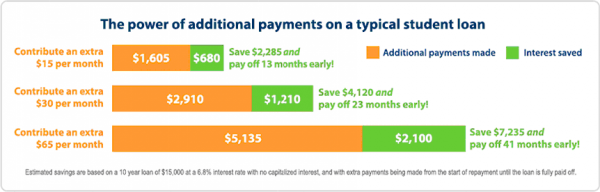
We call it the power of accumulated interest. Because SmarterBucks® rewards are contributed as extra payments, which are meant to be in addition to a user’s regular monthly payments, our users not only get out of debt faster, but they also save interest on the overall cost of their loan. That means that for every $1 earned and contributed in SmarterBucks®, a typical user is really saving up to $2-$3 over the life of their loan. A little math to drive home the point:

4. Does your company have any new products or promotions coming up?
Just for joining, SmarterBucks® members are always entered into our monthly student loan payment giveaways, worth anywhere between $1,000-$2,500 in SmarterBucks®.
In addition, until September 15th, we are running a special promotion to help people reach their first extra student loan payment: any new SmarterBucks® member who earns $5 in rewards (and sets up a valid student loan) will receive their next $10 in rewards on us. Click here for more information.
5. Does your company do any charity work that you’d like us to know about?
Though SmarterBucks® is a for-profit organization, we do consider ourselves social entrepreneurs in the business of smarter student debt management.
6. What would you most like your customers or future customers to know about your company?
Here at SmarterBucks®, we live, breathe, eat, and sleep our mission to help you get student debt-free faster and for less. We’re constantly brainstorming new ways for you to earn rewards, seeking out new inspiring #crushstudentdebt stories to share, and creating or curating new content to help you take control of your financial future. We don’t whine, brood, or vent about the struggle of paying off student loans. We’re action-oriented, and our products and content help you get debt-free faster.
Perhaps most importantly, however, is that we listen to our members. Our SmarterBucks® Ambassador community, a community open to all members who wish to share their feedback and opinions with us, has played, and will continue to play, a critical role in shaping the future of our program.
7. How can your customers get the most out of your product or service?
Make SmarterBucks® a part of your daily routine, and sign up for the SmarterBank® Visa® Debit card. When we look at our members who have gotten the most out of our program, they are the people who are taking a survey a day, doing all of their online shopping in the SmarterBucks Marketplace, asking friends and family for SmarterBucks contributions in lieu of birthday and holiday gifts, and using the SmarterBank® Visa® Debit card for all of their purchases, both in-store and online. It can be a bit of a behavior adjustment at first, but the rewards are worth it.
8. Is there anything else that you would like for Money Saving Mom® readers to know about your company?
SmarterBucks® is part of a unique suite of products, all brought to you from the same parent company, SimpleTuition, dedicated to leading the path to an affordable education. We’re serious about this mission and hope you will join us in our quest.
Interested in becoming a monthly sponsor or advertising with us? Find more details here.
52 Different Ways to Save $100 Per Year: Plan a Weekly Menu {Week 25}
Every week in 2013, I’ll be sharing a different way you can save $100 this year. If you do all of these things, you’ll be able to save over $5,000 this year alone! Many of these things will likely be things you’re already doing, but hopefully all of you will pick up at least a few new ideas or some inspiration from this series.
Menu Planning Saves You Stress and Frustration
Do you dread 5 p.m. because it’s when you have to try to pull something together for dinner or feel guilty about ordering takeout yet again? Do you often find yourself running to the store at the last-minute in a frazzled state rushing through the aisles and throwing random things into your cart in hopes it will magically create a five-course dinner?
The truth is, you could throw away the 5 p.m. dread and almost completely eradicate the frazzled last-minute grocery store trips if you sat down at the beginning of the week and made a menu plan.
Menu Planning Saves You Money
I can’t even begin to calculate how much we’ve saved over the years through the simple act of menu planning.
By planning ahead and buying all the groceries we’ll need for the week in one shopping trip, we save numerous trips to the store throughout the week. In addition, when you have a plan in place for what you’re supposed to be eating each meal and you’ve already purchased the ingredients for those recipes, it’s a lot harder to justify chucking the plan for takeout.
There’s No Perfect Way to Menu Plan
Everyone is going to plan their menu a little bit differently — and that’s perfectly okay! What matters is that you do it, and that it works for your family.
For the record, I’ve tried multiple menu-planning methods. Some have worked better than others and some have worked better for us in certain seasons than in other seasons.

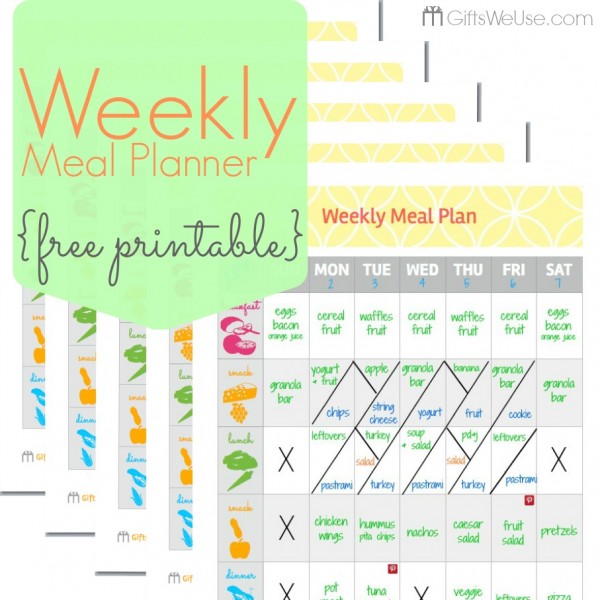
Free printable Weekly Meal Planner from Gifts We Use
My Current Menu-Planning “Method”
I always start by planning my menu around what I have on hand and what’s on sale at the store. I’ve found that freezer cooking definitely makes menu planning easier since it means you have meals already in the freezer ready to go.
I also keep a running list of Recipes I Want to Try on a Pinterest Board. I always consult this when making our weekly menu plan to get some fresh ideas and inspiration.
Finally, I add in things that I know I can get inexpensively — either at Aldi or elsewhere. I’m so thankful we have the luxury of having an Aldi close by!
There are times when my cupboards and freezers are pretty bare and it seems the sales are sparse. If that’s the case, I see how much grocery money I have to work with, and I usually pull out some cookbooks to get the wheels in my head going. Or I’ll go to some of my favorite food blogs for ideas. (You can also check out Menu Plan Monday for a plethora of menu ideas from around the blogosphere.)
We keep our meals simple around here, so that makes menu-planning a lot easier. I also pretty much never follow the menu plan to a tee — I’ll usually shuffle some things around, nix a recipe or two for lack of time or because I discovered another recipe that I think will work better.
Find a Method That Works For You
You might find it helpful to take 30 minutes and make a list of 30 meals your family loves to serve as inspiration if you’re ever feeling a lack of creativity while menu-planning.
Or, you could have pre-established themes for dinners each week. Tsh, over at SimpleMom, does this and here’s an example of what her Themed Menu Plan has looked like:
Mondays – pasta
Tuesdays – soup, salad, and/or sandwiches
Wednesdays – stir fry
Thursdays – crock pot
Fridays – pizza
Saturdays – something new
Sundays – something easy
Jenna from the Newlyweds blog left a comment sharing how she plans her menus:
I try to plan two meals around items I already have at home in the pantry or freezer, and then plan some meals based on what’s on sale, and some based on what we would like to eat. I keep my plan flexible and allow for anything that will pop up. I also like to keep items on hand all the time for a few quick meals like taco soup and spaghetti. This way, if some comes up, I can whip these up in a jiffy. –Jenna @ Newlyweds
It might seem like a daunting task at first — especially if this is all new to you! — but don’t be overwhelmed. Do the best you can do and remember that it’s never going to be absolutely perfect. Over time, though, you’ll likely begin to realize significant savings just by taking a few extra steps and putting the effort forth to make a plan.
Free Menu Planning Worksheet and Grocery Shopping Lists
To aid you in your menu-planning and grocery-list-making, Joy from FiveJ’s and I put together some free downloads for you. (By the way, Joy put together a snazzy free downloads page here so you can access all the free downloads we currently have available. Enjoy!)
Meal Planning Worksheet :: This brainstorming form contains spaces to write down store deals, coupons, items on hand, and recipes that can be made from those items.
Shopping List :: Contains space for the items to purchase, the cost of the item, whether there is a coupon for it, and how much the coupon is for. Also includes a space for notes where you can record extra information about your shopping trip.
Two-Store Shopping List :: Two separate shopping lists on one page, each of which includes space for the items to purchase, the cost of the item, and whether there is a coupon for it. Also includes a space for notes where you can record extra information about your shopping trip.
Psst! If you don’t have the time or energy to mess with planning a menu, but you really would like to benefit from the organization and cost-savings of having a menu plan, I’d recommend checking out eMeals.
Do you have some menu-planning tips & tricks to add to my list?
11 Blog Post Ideas For Those Days When Your Brain is Fried
Ever have a day when you want to blog something, but you just feel like you have nothing to say or no energy to come up with a creative idea? Well, here are 11 tried and true ideas for you:
1. Ask a question
People love to share their opinions and thoughts. A lot of the questions that readers submit to me via email are ones that I post as reader questions. I learn so much from the input that you all post!
Example: Ask the Readers Questions
2. Share a quick tip
As you’re going about your day, look for simple things you do that others might find helpful. Maybe a time-saving tip, a kitchen tip, an organization tip… anything you do that makes your life easier and might be helpful to someone else, too.
Sometimes it’s the simplest ideas that are people’s favorite posts!
Example: Shop With a Calculator
3. Comment on an article or quote from a book
When you are reading articles or books, write down quotes you love or thought-provoking ideas you come across. A simple quote or idea from a book can be a great springboard for an insightful post.
I keep a running log of these ideas/quotes and they are instant blog fodder on days when I need a quick post idea.
Example: The Multitasking Myth
4. Tell a story
Did something funny or interesting happen to you that day or week? Share it as a post — especially if there’s a great example or lesson you learned from the story.
Example: A Shiny New Car is Not Always All It’s Cracked Up to Be
5. Write about a product you love
Have a kitchen gadget, app, or other sort of tool that is a life-saver? What about a product you just love? Write a quick post about it.
Example: Our Craigslist Table
6. Share a picture post
Sometimes, few words are needed.
Example: Freezer Cooking Posts
7. Answer a comment or email from a reader as a post
If you get an email from a reader that asks a question you think others would be interested in hearing the answer to, turn it into a post. (Be sure to remove details that the emailer might not want publicly shared or get their permission to post the question on your blog first.)
In addition, if you’re answering a comment and your answer begins to get lengthy, consider turning it into a blog post instead.
Example: Is it Possible to Survive on a $30/Week Grocery Budget?
8. Request help and input
Are you trying to decide which paint color to use, craft project to try, or book to read next? Why not ask your readers? I bet they’d love to give their input — and these types of posts always bring out lots of responses and fun engagement.
Example: What Should I Do With All These Canned Biscuits?
9. Write a book review
If you read a great book, don’t keep it to yourself. Write a quick post sharing your thoughts on the book and why you’d recommend it to your readers.
Example: Platform by Michael Hyatt
10. Share 10 links you love
Top 10 posts are always a hit — and they are usually pretty simple to put together, too. Best of all, the possibilities for Top 10 lists are just about endless. Can’t come up with 10 ideas, share 9 and ask your readers to supply #10.
Example: Top 10 Apps That Will Save & Make You Money
11. Give something away
Readers love giveaways. And they love them even more when you give away something of your own — even if it’s something small. Put together a fun little package of goodies and write about why you chose each item and then give the package away to one commentor.
Example: Reader Giveaway Extravaganza
What are your ideas for quick & easy posts you can write when you feel like your brain is fried? I’d love to hear.
10 Goals For This Week
Last week’s goals:
Family/Marriage/Mothering Goals
1. Read 3 chapters of The Borrowers to the children. Finish reading The Queen’s Smuggler with Kathrynne.
Read 3 chapters of Caddie Woodlawn with Kaitlynn. Read a few picture books with Silas.
2. Write a love note to Jesse.
3. Start our fall homeschooling schedule.
Personal Goals
4. Work on memorizing & reviewing Romans 1:1-22.
5. Continue with the ChaLean Extreme Program. Run 6 miles. {I’m so enjoying running again that I ran out of time to work on the ChaLean program… I’m not sure whether that’s a good problem or a bad problem, but I’m aiming to do both this coming week.}
6. Read The Myth of Multitasking, Loving the Way Jesus Loves, First: What It Takes to Win by Rich Froning, Leaving Yesterday, and Love Works.
Homemaking Goals
7. Work for 30 minutes on my embroidery project.
8. Try two new recipes.
Business Goals
9. Work on updating some posts for Pinterest.
10. Start working on a new ebook.
This week’s goals:
Family/Marriage/Mothering Goals
1. Read 3 chapters of The Borrowers and 3 chapters of The Tanglewoods’ Secret to the children. Finish reading The Queen’s Smuggler with Kathrynne. Read 3 chapters of Caddie Woodlawn with Kaitlynn. Read a few picture books with Silas.
2. Write a love note to Jesse.
3. Go on a date with Jesse.
Personal Goals
4. Work on memorizing & reviewing Romans 1:1-23.
5. Continue with the ChaLean Extreme Program. Run 10 miles.
6. Read Loving the Way Jesus Loves, First: What It Takes to Win by Rich Froning, Leaving Yesterday, and Love Works.
Homemaking Goals
7. Work for 30 minutes on my embroidery project.
8. Try two new recipes.
Business Goals
9. Work on updating 10 more posts for Pinterest.
10. Write at least 3 posts for the 52 Ways to Save $100 a Year series. {Finally!}
How did you do on last week’s goals? What are your goals for this week? I’d love to have you share your progress on last week’s goals and your goals for this coming week in the comments. Of, if you’ve blogged about it, leave your direct link below. Let’s cheer each other on to live purposeful and productive lives!
You can download a free customizable weekly goal-planning sheet here.
OVER-SPENDING EVERY SINGLE MONTH?Grab these FREE Budgeting Sheets!
Click here to download!Anna’s Shopping Trip at Martin’s: $137 worth of items for $24!
Anna’s Shopping Trip at Martin’s: $137 worth of items for $24!

The following shopping trip was submitted by Anna who blogs at Frugal For You:
We moved to Virginia almost two years ago. All of the grocery stores were new to me and I had no idea what to expect. Money Saving Mom® has a database for regional store deals. I was able to find coupon match-ups for grocery stores in my area and start saving money. I even used this to search for grocery deals when we vacationed in California!
With the help of the store deals page, not only did I find match-ups, but I also found a local frugal blogger in our area. I even met her in person at a coupon swap she hosted at the library!
Now, about my shopping trip. I was able to buy $137 worth of items for only $24. Martin’s is often more expensive, but they sometimes have great sales. Also, Martin’s still doubles coupons, unlike our area Kroger stores.

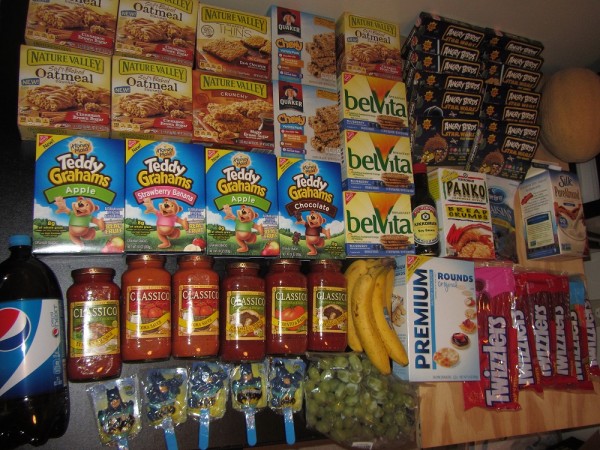
This is what I bought in two transactions:
- Evol Fire Grilled Steak – $4.99 – Used FREE coupon from contacting company!
- Pepsi Next – $1.79 – Used FREE coupon from mailer!
- 5 Nature Valley Oatmeal Squares and Bars ($2.50 each) – $4.75 – Used various coupons (these doubled up to $1.00)
- 2 Quaker Chewy Bars – $2.00 each – Used $1/2 coupon from 8/4 RedPlum insert
- 6 Twizzlers – 3 for $5.00 – Used two $1/3 coupons from 7/28 SmartSource insert
- 1 Nabisco Premium Rounds – $1.99 – Used $1 off coupon from 8/11 SmartSource insert
- 3 Belvita Breakfast Cookies – $2.50 each – Used three $1 off coupons from coupon booklets
- 4 Teddy Grahams – $2.50 each – Used three $1 off coupons from coupon booklets
- 6 Classico Sauces – $2.50 each – Used two $1 off coupons
- Silk Almond Milk – $2.60 – Used $1 off coupon from register
- Kikkoman Soy Sauce – $1.66 – Used $1 off coupon
- Kikkoman Panko – $1.66 – Used $1 off coupon
- 5 Batman Treats – $0.27 each – 75% off markdown
- 12 Angry Birds Gummy Snacks – $0.27 each – 75% off markdown
- Grapes ($0.88 per lb) – $1.94
- Bananas ($0.39 per lb) – $1.02
- Cantaloupe – $2.00
- Craisins – $1.00
Three store promos, two Catalina deals, store coupons, and a “return” helped to lower my out-of-pocket costs:
- Buy $20, get $10 off instantly for Nature Valley, Quaker, other breakfast products
- Buy 7 snack items, get $5 off instantly (for Nabisco and Twizzlers)
- Get $2 Catalina back for 3 Classico sauces (did this twice)
- Get $3 Catalina back for 5+ Nature Valley items
- $5 off $40 purchase from the local newspaper
- Customer service gave me $11.34 refund, honoring their 200% money-back freshness guarantee. I asked for a refund at customer service for meat that went bad before the sell-by date (my first time asking them for a refund!).
Total out-of-pocket: $24, plus I got a $2 Catalina for next time and I will get $5 from Saving Star for buying $15 in Classico Sauces

Some money-saving tips I used in this shopping trip:
- Sign-up for Saving Star to get extra savings on top of coupons.
- Check the Sunday paper for extra coupons. The $5 off $40 Martin’s coupon was in the front page section of the paper, not in the coupon inserts.
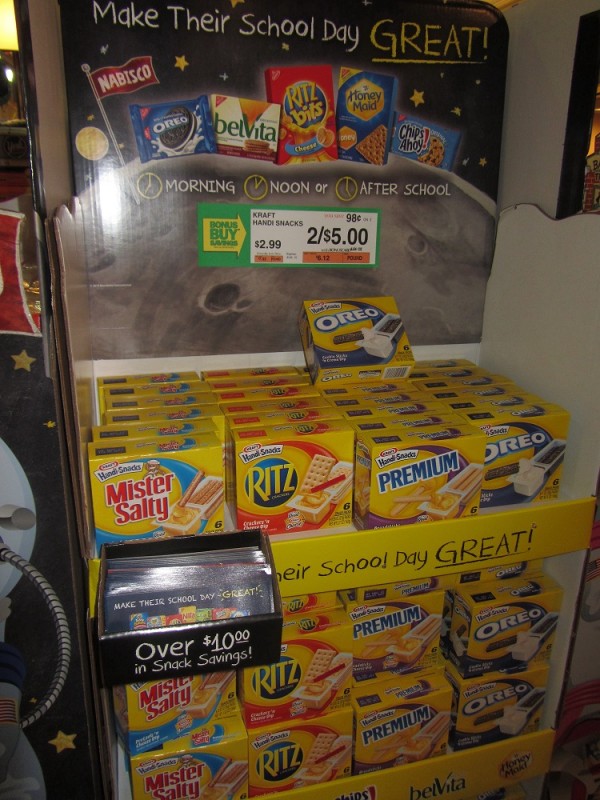
- Check out stand-alone product displays since they usually have tearpads or coupon booklets.
- Some libraries allow certain coupon printing (another source for extra coupons).
- Know the store’s satisfaction guarantee. Martin’s gives 200% refund with receipt and the product doesn’t have to be returned.
Anna Thomas blogs at Frugal For You. In 2009, she Googled “frugal mommy blogs” and came across Money Saving Mom®. She learned better couponing skills that allowed her to be a stay-at-home mom and homeschool her kids. Anne is still in awe of the gifts that a frugal lifestyle has given her family.
Have you gotten a great deal thanks to a tip you’ve found here on MoneySavingMom.com? Take a picture of your deal/purchase and write a short post on the deal details and submit it here. If your submission is chosen to be posted, I’ll send you a $25 Amazon gift card! Note: the more creative, unique, and well-written your post, the more chance it will have of being posted.
3 Unbelievably Simple Calendar Tips that Will Save You Money

Guest post from April of Power of Moms
We all have busy lives (four little boys are having a Nerf war in my living room as I type), which is why I love it that moms online can share their best ideas with one another!
Below are three incredibly simple calendar tips I use to help all of us stay on top of the tasks we need to accomplish — and believe it or not, these tips have helped me to save thousands of dollars in the process!
Tip #1: Create Calendar Triggers
I’d never heard of a “calendar trigger” before reading David Allen’s best-selling book, Getting Things Done®, but now they’re my best friends. Here’s an example why:
Last year I signed up for a discounted Internet plan through our local phone company. After locking in an incredible rate for 12 months, the customer service representative warned me, “If you want to keep this rate, you have to give us a phone call right before your first year is up. Otherwise, your bill will increase by $30 a month.”
Panic set in for a moment. What if I forget to call?
But then I remembered this calendar-trigger approach, and I simply went to my Google Calendar and created an event titled “Call Phone Company for Reduced Internet Rate” and added an email trigger for 11 months into the future. Sure enough, the trigger came through, I called and secured an even better rate, and now I’ve got a calendar trigger set up to remind me to call again next year.
This one simple trigger has already save us $780 — with no stress.
Tip #2: Keep Your Calendar Clean by Using Context-Based Lists
Have you ever cluttered up your calendar with undone tasks you keep forwarding from page to page to page? (You’re not alone.)
This idea, also from Getting Things Done®, has enabled me to group tasks by context, so instead of sighing over a super long list of random things to do, I can work on clusters of important responsibilities whenever the time is right.
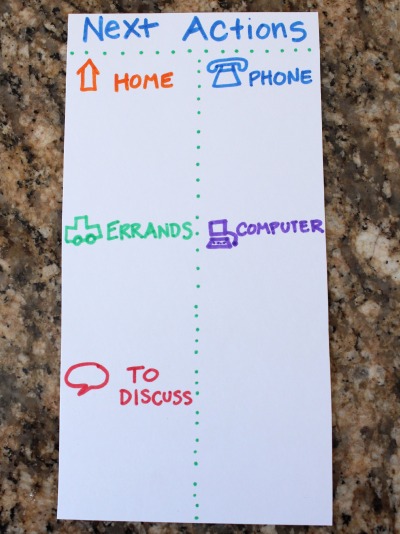
Because I’m a paper planner girl, I just use a small card stock insert that is divided into the following sections:
- Home
- Errands
- To Discuss (usually with my husband)
- Phone
- Computer

A list like this could also be created on a phone or tablet’s notepad (I love the Evernote app).
Using context-based lists saves me tons of time and tons of money. I don’t waste gas because I can get all my errands done at once. I don’t forget to call the insurance company when they make a mistake on my bill, and I can easily keep up with basic home repairs, dental appointments, and hundreds of other little issues that would otherwise grow into time-consuming, expensive problems (like that time I ended up with $63 in library fines).
The point is that we clearly define these categories, collect our lists into one easily-accessible place, and keep them short and actionable so we are consistently getting things done efficiently and well.
Tip #3: Partner Your Calendar with Your Email Inbox
I used to work off of two different systems — my calendar/paper planner and my email inbox. Now I keep my emails to zero by shuttling action items onto my calendar (and filing or deleting the corresponding email messages).
Here are a few examples using the emails I receive from MoneySavingMom.com:
I recently saw Crystal’s offer for us to download a free copy of her Guide to Freezer Cooking. I quickly downloaded the PDF (because David Allen’s two-minute rule encourages us to “just do” any task that takes two minutes or less), and then I added “Review Freezer Cooking Guide” to my Computer list. Then I knew I wouldn’t forget to read it. (And I love it, by the way.)
When I find coupons for items I need to buy at my local store, I simply print the coupons, place them in my purse or car, and add the store name to my Errands list. If there are specific expiration dates I don’t want to miss, I note those on my actual calendar pages.
Other offers (like the online family job chart or the student loan repayment service) can go on my “To Discuss” list if I want to talk them over with my husband before moving forward.
Calendar triggers could be used here, as well, if the offers are open for a limited time.
Uniting our tasks into one seamless system gives us the brain space to more fully enjoy time with our children. It helps us to feel more in control of our lives. And yes, it helps us to wisely use our resources and save lots of money.
As a special gift to the Money Saving Mom community, I am excited to offer a free giveaway of our Mind Organization for Moms program, which regularly sells for $50 on our Power of Moms site. (No strings attached!)
It’s basically “Getting Things Done® for Moms,” and it’s is full of simple tips, photos, videos, PDFs, podcasts, and mom-created organization tips you’ll love. Signing up takes just two minutes (so you don’t even have to add this to your calendar!)
Click here to learn more about the Mind Organization for Moms giveaway (and please feel free to share it with your friends!).
April Perry is married to her best friend, Eric, and is the mother of Alia, Grace, Ethan, and Spencer. She co-directs Power of Moms, blogs at Power of a Family, and satisfies her insatiable love for organization through her GTD®-based Mind Organization for Moms program.
This Week’s Menu Plan + Freezer Cooking in an Hour Plan

Breakfasts
Breakfast Cookies, Oatmeal, Cereal, Eggs, and/or Fruit
Lunches
Mac & cheese, fruit
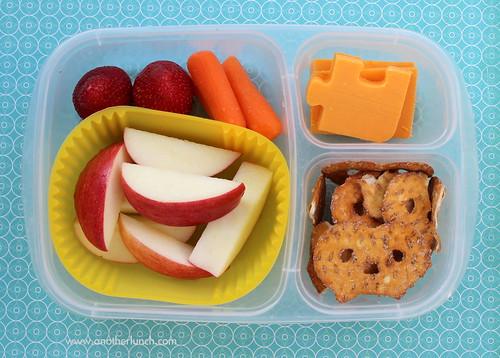
Snack-y lunch {veggies, cheese, yogurt, fruit, crackers, etc.}
PB&J, carrot sticks, apples
Cheese quesadillas, carrot sticks
Leftovers x 3Snacks
Fruit/veggies
Popcorn
Boiled eggs
Single Serving Peanut Butter Cookie
Breakfast CookiesFreezer Cooking in an Hour (I’ll share more how this goes later on this week!)
Healthy Choco-Cherry Oatmeal Cookie Recipe
To Die For Blueberry Muffins
Breakfast Cookies (different recipe than I tried last week — just because I wanted to compare it!)
World’s Easiest Crockpot Refried Beans
Dinners
Steak, Cheesy Hashbrown Potatoes, fruit, steamed veggies
Crockpot Mexican Lasagna, steamed veggies, fruit
5 Star Cheeseburger Casserole, steamed veggies, fruit
Chicken Broccoli Rice Casserole, To Die For Blueberry Muffins, fruit
Bean & Cheese Burritos, fruit, steamed veggies
Dinner with extended family
Dinner with friends
Swagbucks Paid for My Camera

Today’s Swagbucks success story is from Melissa:
One of my favorite hobbies is taking pictures and scrapbooking. I have always wanted a nice digital camera that was a step up from a point and shoot, but I couldn’t afford a new one right away. I decided I would save up my Swagbucks to buy a camera on Amazon.
After a lot of research (I knew I wanted one that was less than $200, had a good zoom, and used a lithium battery), I found the camera I wanted to buy, took note of the price, and set my goal!
I do not spend hours upon hours on my computer a day, but I try to always earn some Swagbucks by doing the daily poll (1 swagbuck), NOSO (2 swagbucks) and through the toolbar (1 swagbuck). I do this daily right before I do anything else on the computer and it takes less than 3 minutes! Because of that, I earn a minimum of 4 Swagbucks a day.
I have also found if I search 4 or 5 times within 20 minutes that I’ll often get awarded anywhere from 6-15 Swagbucks (once I earned 25 with one search!) In addition, sometimes when I am just browsing the web, I will pull up SBTV and watch something in the background. This earns me 3 Swagbucks for every 10 videos I watch.
I didn’t get my camera as soon as I wanted one, but I think that patience is one of the many traits of being frugal! If you earn just 15 Swagbucks a day, you can get a $5 Amazon gift card every month! Swagbucks hasn’t made me rich, but it has let me spoil myself every once in a while. 🙂
Now I get to enjoy taking pictures on my nice NEW camera that Swagbucks paid for!
Melissa: Could you email me? We don’t have your email address on file and want to make sure we send you your $50 Amazon gift card as a thank you for submitting your story!
Freezer Cooking in an Hour: Bananas, Chicken, Breakfast Cookies, and 5-Star Cheeseburger Casserole

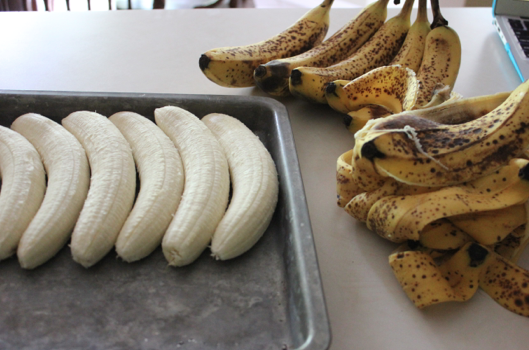
I finally did some more freezer cooking yesterday — and it felt so good! I first froze a bunch of too ripe bananas to use in smoothies and banana bread.

Then I baked some chicken to chop and freeze for homemade pizza and chicken casseroles.

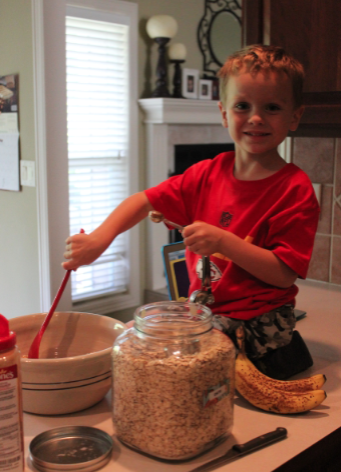
This little guy loved helping me make breakfast cookies.

Of course, I didn’t follow the recipe exactly… what’s new?! 🙂
But I was super happy with how they turned out — see the tweaked recipe here.

I also made some 5 Star Cheeseburger Casseroles to freeze (and yes, those are peas you see peeking out from under the cheese — I threw them into the mix since I had some leftover in the fridge!)


Do you have a fun and frugal DIY idea to share? I’d love to hear about it! Read the submission guidelines and submit it