

Guest post from April of Power of Moms
We all have busy lives (four little boys are having a Nerf war in my living room as I type), which is why I love it that moms online can share their best ideas with one another!
Below are three incredibly simple calendar tips I use to help all of us stay on top of the tasks we need to accomplish — and believe it or not, these tips have helped me to save thousands of dollars in the process!
Tip #1: Create Calendar Triggers
I’d never heard of a “calendar trigger” before reading David Allen’s best-selling book, Getting Things Done®, but now they’re my best friends. Here’s an example why:
Last year I signed up for a discounted Internet plan through our local phone company. After locking in an incredible rate for 12 months, the customer service representative warned me, “If you want to keep this rate, you have to give us a phone call right before your first year is up. Otherwise, your bill will increase by $30 a month.”
Panic set in for a moment. What if I forget to call?
But then I remembered this calendar-trigger approach, and I simply went to my Google Calendar and created an event titled “Call Phone Company for Reduced Internet Rate” and added an email trigger for 11 months into the future. Sure enough, the trigger came through, I called and secured an even better rate, and now I’ve got a calendar trigger set up to remind me to call again next year.
This one simple trigger has already save us $780 — with no stress.
Tip #2: Keep Your Calendar Clean by Using Context-Based Lists
Have you ever cluttered up your calendar with undone tasks you keep forwarding from page to page to page? (You’re not alone.)
This idea, also from Getting Things Done®, has enabled me to group tasks by context, so instead of sighing over a super long list of random things to do, I can work on clusters of important responsibilities whenever the time is right.
Because I’m a paper planner girl, I just use a small card stock insert that is divided into the following sections:
- Home
- Errands
- To Discuss (usually with my husband)
- Phone
- Computer
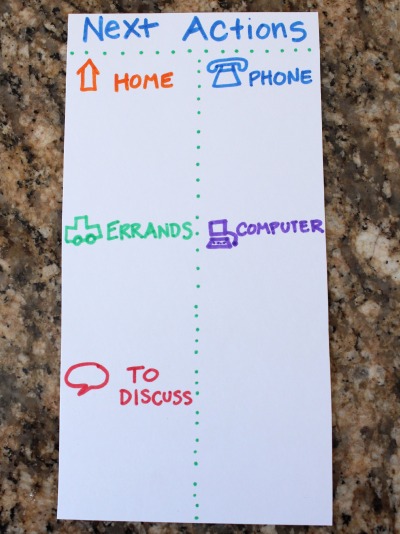
A list like this could also be created on a phone or tablet’s notepad (I love the Evernote app).
Using context-based lists saves me tons of time and tons of money. I don’t waste gas because I can get all my errands done at once. I don’t forget to call the insurance company when they make a mistake on my bill, and I can easily keep up with basic home repairs, dental appointments, and hundreds of other little issues that would otherwise grow into time-consuming, expensive problems (like that time I ended up with $63 in library fines).
The point is that we clearly define these categories, collect our lists into one easily-accessible place, and keep them short and actionable so we are consistently getting things done efficiently and well.
Tip #3: Partner Your Calendar with Your Email Inbox
I used to work off of two different systems — my calendar/paper planner and my email inbox. Now I keep my emails to zero by shuttling action items onto my calendar (and filing or deleting the corresponding email messages).
Here are a few examples using the emails I receive from MoneySavingMom.com:
I recently saw Crystal’s offer for us to download a free copy of her Guide to Freezer Cooking. I quickly downloaded the PDF (because David Allen’s two-minute rule encourages us to “just do” any task that takes two minutes or less), and then I added “Review Freezer Cooking Guide” to my Computer list. Then I knew I wouldn’t forget to read it. (And I love it, by the way.)
When I find coupons for items I need to buy at my local store, I simply print the coupons, place them in my purse or car, and add the store name to my Errands list. If there are specific expiration dates I don’t want to miss, I note those on my actual calendar pages.
Other offers (like the online family job chart or the student loan repayment service) can go on my “To Discuss” list if I want to talk them over with my husband before moving forward.
Calendar triggers could be used here, as well, if the offers are open for a limited time.
Uniting our tasks into one seamless system gives us the brain space to more fully enjoy time with our children. It helps us to feel more in control of our lives. And yes, it helps us to wisely use our resources and save lots of money.
As a special gift to the Money Saving Mom community, I am excited to offer a free giveaway of our Mind Organization for Moms program, which regularly sells for $50 on our Power of Moms site. (No strings attached!)
It’s basically “Getting Things Done® for Moms,” and it’s is full of simple tips, photos, videos, PDFs, podcasts, and mom-created organization tips you’ll love. Signing up takes just two minutes (so you don’t even have to add this to your calendar!)
Click here to learn more about the Mind Organization for Moms giveaway (and please feel free to share it with your friends!).
April Perry is married to her best friend, Eric, and is the mother of Alia, Grace, Ethan, and Spencer. She co-directs Power of Moms, blogs at Power of a Family, and satisfies her insatiable love for organization through her GTD®-based Mind Organization for Moms program.

























 A testimony from Amy from





 Do you have a fun and frugal DIY idea to share? I’d love to hear about it! Read the submission guidelines and submit it