
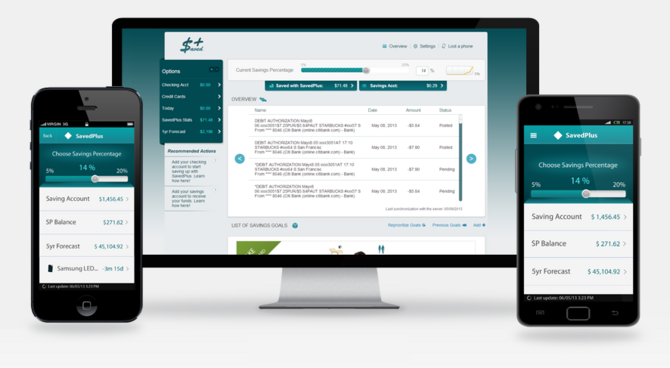
Need a little discipline to help you put money in your savings account? SavedPlus is an app that helps you automatically build your savings when you shop. Here’s how it works:
- Download the SavedPlus app to your smartphone, or use it online at SavedPlus.com.
- Register with SavedPlus.
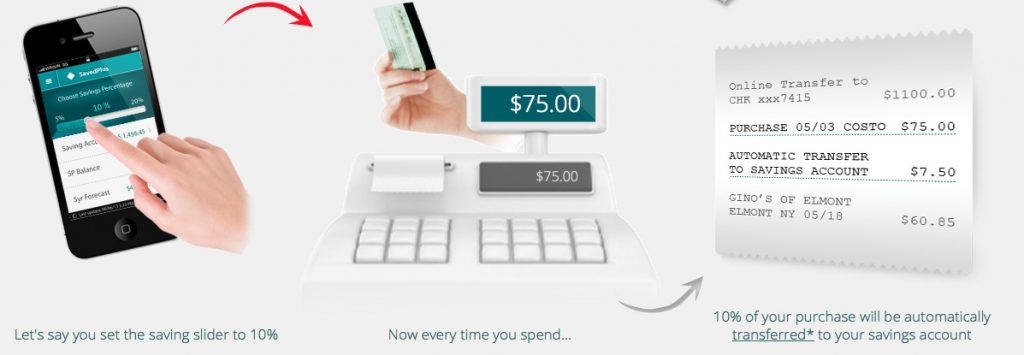
- Set the savings slider. Decide how much you want to save every time you spend. 5% to 20% of your purchase amount will be automatically transferred from your checking to your savings account.
- Link your bank accounts to SavedPlus. SavedPlus is bank independent and should work with any bank that offers online banking.
- Choose your source and destination accounts. If you have more than one checking or savings account, you’ll choose the accounts you’d like to use with SavedPlus. You can set your savings to deposit into a traditional savings account, a money market account, or even long-term savings like a 401(k) or an IRA.
- Set your savings goals. Save for your emergency fund, a college fund, debt retirement, and more.
- Track your savings and adjust your settings. You can log in and track your progress or adjust your savings slider anytime through the app or online at SavedPlus.com.
Get a $15 Bonus!
For a limited time, you can get a free $15 savings account bonus when you sign up for SavedPlus using the promo code promo10. To get this offer, you’ll need to install and link your bank accounts to the SavedPlus app. Your $15 savings account bonus should be deposited within a week.
This post was underwritten by SavedPlus. See our disclosure policy here.








 Read 4 chapters of