Time Management

I’ve always been pretty fanatic about keeping my email inbox cleaned out.As a result, for the past few years, I’ve deleted diligently and filed fastidiously, and this has worked alright.

However, the more email I received, the more I started dumping things into my “To Answer Later” file. This file would soon fill up with 50 to 75 messages that needed to be addressed — some that required a significant amount of time to deal with (a lengthy form that needed to be filled out for something or other, information that needed to be gathered and emailed back, an article I needed to write and submit, etc.)

I made it my goal to deal with my To Answer file on Saturdays. But this stopped working efficiently as the number of emails in the To Answer File grew. Some Saturdays, I wouldn’t have time to answer the emails — which then meant their number was doubled the next week.

As a result of not being able to find a big time block to deal with these emails, I’d often miss important deadlines and opportunities. These unanswered and undealt-with messages hung over my head like a dark cloud, constantly making me feel behind and unorganized.

Clearly, I needed a new system! So, at the beginning of this year, I drew a line in the sand and made some significant changes to my email system.

The result? Not only am I hitting Inbox Zero almost every single day, I’m also much more productive and efficient with my email time. Plus, I’m answering emails much more quickly than I ever used to!

Here’s what has worked for me:

1. Unsubscribe Ruthlessly

I started examining every single email list I was subscribed to. I’d ask myself, “Have I found something from this email list to be valuable in the past few months?” If so, I wouldn’t unsubscribe.

In just about 90% of the cases, I realized I was deleting the emails from each list as they came in every week — or as much as every day. Sure, I’d delete them immediately, so it’s not like it was clogging up my inbox.

But why was I wasting minutes every single day deleting emails that I didn’t care anything about when I could take 5 seconds to unsubscribe and never see an email from that company in my inbox again? Such a revolutionary thought, I know. :)

In all honesty, though, it was something I’d not given a lot of thought to. I’d just delete, delete, delete. However, since taking a week to unsubscribe from 90% of the lists I was signed up to, I’ve realized how much time and inbox space this is freeing up!

For example, it used to be when I’d check my email in the morning, I’d have at least 40-60 new emails, the bulk of which I’d delete. Now, it’s unusual for me to have more than 20 each morning. Most of those 20 are emails that need to be responded to or in some way dealt with. But instead of having to go through my email first thing and delete a bunch of unneeded emails. Now, I can just start responding to emails right off the bat!

I have figured out that just the act of ruthlessly unsubscribing is saving me a good five to 10 minutes of time every single day. That doesn’t seem like too much, until you multiply that out over the course of a week (35 to 70 minutes), a month (150 to 30 minutes), or a year (1,825 to 3,650 minutes). That’s a lot of minutes saved!

Stop the Social Media Insanity!

Please do yourself a favor and unsubscribe from all notifications you possibly can from social media. You can always go look up and see who your new Twitter followers are or who left you a comment on Facebook. You don’t need those notifications interrupting your workflow throughout the day. I promise you will survive just fine without them!

2. Use the Delete Button Liberally

The delete button is your friend. Use it as your secret productivity weapon. If you don’t need an email, just delete it. Right now.

If you think you might need some of the information on it in the future, then just use the handy-dandy feature on GMail and archive. {You are on GMail, right? I am convinced is the best productivity email service on the planet!}

For those of you who currently have 35,000 emails in your inbox, the delete button needs to become your very best friend. Today. To save yourself the extra time and effort, check out Unroll.me. One of my readers recommended it on my Facebook Page this morning and it looks like a fabulous way to deal with a huge load of emails in an efficient manner.

Save Yourself a Little Time With Send & Archive

Have you added the Google Send & Archive option to your email? This saves you the step of having to send an email and then delete it. Just press Send & Archive and your email is sent and archived. Ta-da!

3. Set Up Filters Fanatically

Maybe you can’t unsubscribe from an email, but you can always filter it — provided you have GMail. I use filters for affiliate notifications that I can’t turn off, junk email that I can’t subscribe from, and more.

I also have filters set up for submissions to my site. So if you submit a deal or a guest post, those go in a separate folder that I check when I’m posting deals or reviewing guest posts. This keeps them in an organized place that I can easily access, without taking up real estate in my inbox.

4. Deal With Email Immediately

I saved this suggestion for last, because this is truly what has revolutionized my inbox. Before my “Inbox Revolution”, I filed things that would take longer than a minute or two to answer.

This truly only just resulted in a bulging To Answer File. Yes, it wasn’t in my inbox, but it was still weighing me down because I knew it was lurking there waiting to be dealt with.

At the beginning of the year, I decided to change my strategy and stop filing any email in my To Answer file for a few weeks. I was amazed at how this forced me to be more efficient!

I stopped asking myself, “Should I file this to answer later or take the time to answer it now?” Instead, I just answer the email right then and there, if at all possible, and then delete it.

Usually, there are a few emails that will require longer answers. In that case, I’ll leave those few in my inbox until I have a longer time-slot to deal with them. But I try to not let anything stay in my inbox for longer than a few days, preferably a few hours.

By adopting this strategy, it’s opened my eyes to how much time I was wasting just moving around virtual files and furniture, rather than just getting the job done.

How I Keep My Email Inbox to Fewer Than 5 Emails

A. Check Email

B. Immediately Delete Any Emails That Don’t Require Opening or Answering (such as someone just responding with a one-sentence confirmation)

C. Unsubscribe From Any Subscription That Has Still Made It Into My Inbox

D. Open and Deal With All Emails

  • Respond to those requiring only a few-sentence response first.
  • File emails that need to be filed (such as a deal that someone submitted via email rather than through my deals submission form).
  • If time, respond to as many emails as possible that require a lengthier response. Oftentimes, I find that it doesn’t take me at all as long as I think it will if I just dive in and start writing!

E. Never Allow There to Be Any More Than Four Emails In My Inbox <— This has been key for me. If there are more than four, it means that I highly prioritize email answering above other computer work.

What tips & tricks do you have for taming your email inbox?

photo credit; photo credit; photo credit

How to Find More Time in Your Day

by Crystal on May 04, 2012

If you’re a mom (especially a young mom) who is feeling like you don’t have enough time in your day, head over to my post on MomLife today for a simple tip that has helped me have more peace and sanity — plus made me feel like I have more time in my day.

You’re free to disagree with me (hey, what works for me might not work for you!), but don’t knock it until you’ve tried it. :)

Looking for more time management tips? Be sure to check out my Time Management 101 series.

My Top 3 Tips for Getting Stuff Done

by Crystal on February 22, 2012

{Today’s To Do List}

Feeling like you’re always behind, stuck going around and around in circles, and never really getting anywhere or finishing anything? Here are three of my top tips for getting stuff done:

1. Keep Your To-Do List Short

You need a plan for your day, otherwise, you’ll most likely just end up running in circles. However, if you try to bite off more than you can chew in a day’s time, you’ll end up overwhelmed from the get-go.

Set yourself up for success by creating a short to do list for each day. I suggest no more than 5-7 items on your list.

It’s better to only plan to do four things and to actually accomplish three of them, then to make a list of 47 to-do items, and a only get a few bits and pieces of some of them done.

2. Make Your Daily Goals Measurable

When you make your to-do list, be realistic. Don’t write down “Clear out clutter in the whole house” or “Clean house” or “Find a new job.”

Break things down into bite-sized, manageable pieces and be specific. For instance, instead of writing down “Clear out the clutter in the whole house.” Set a goal to spend 30 minutes clearing out the clutter in one room. Instead of attempting to clean the whole house, make a goal to vacuum two rooms, do a load of laundry, and clean the toilets.

Not only are specific, measurable goals much more concrete, they are also much more manageable. The thought of cleaning the whole house is overwhelming, but knowing you just have to vacuum two rooms, finish a load of laundry, and clean two toilets is much more achievable. Plus, when you set measurable goals, you know when they are accomplished.

3. Use Your Minutes Wisely

If you want to have more productivity and efficiency in your life, you need to become the master of your minutes. If you find yourself with a short two-minute window of time, don’t just twiddle your thumbs. Do something. I’m always surprised at how much can be accomplished in a few minutes’ of time.

Things You Can Accomplish When You Have 2-3 Minutes’ of Free Time:

::Write a short thank you note or email.

::Clean the sink or toilet in the bathroom.

::Switch a load of laundry from the washer to the dryer.

::Pull out dinner from the freezer.

::Make a healthful snack to munch on instead of grazing on high-calorie, low-nutrition snacks.

::Take your vitamins and drink a glass of water.

::Do 25 sit-ups.

::Do a quick clean up of a room.

::Read a short story to a child.

::Text your husband to tell him you love him and appreciate him.

::Read 2 pages of the book you’re currently reading.

::Make a quick phone call.

I’m sure you all could come up with a thousand other ideas for how to wisely use the little cracks up time that pop up throughout the day. Don’t let those little time slots slip by unproductively–it’s amazing how much they can add up in your favor!

What are your top tips for getting things done? I’d love to hear!

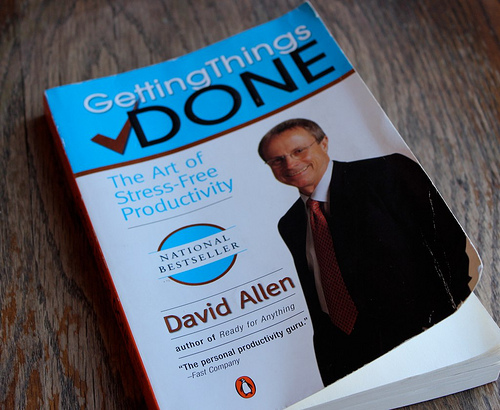
Good Reads: Getting Things Done by David Allen

by Crystal on December 31, 2011

Getting Things Done was on my booklist to read in 2011, and, considering the name, I figured I actually better finish reading it this year. :)

I was expecting to be overwhelmed with guilt by the book–feeling like I had to set up all these new processes and procedures in order to get my life in order. However, I was really encouraged to realize that I’ve unintentionally set up processes and procedures for many areas of my life that are working quite well.

Everything in my office has a place and everything in it serves a specific purpose. I have a process for mail, a process for email, and a process for dealing with paper clutter and stuff clutter.

So I was excited to realize that there’s no need to overhaul something that’s already working well most of the time. Instead, I just need to work on tweaking and refining these processes so that they serve me even better.

That said, reading this book helped me to realize very clearly that my paper planner system is no longer working well for me and that’s likely one of the reasons my head has been spinning so much recently. My home management binder has been great for a daily to-do list and overview, but, with the increased business responsibilities on my plate in the last few months, I need to be able to have a running to-do list of business projects and I also need to be able to schedule out projects, to-do’s, and reminders days, weeks, and months ahead of time.

Since my husband manages a busy law firm and has to schedule out and keep on top of all sorts of client stuff and court appearances, he’s been helping me think through what would work best for me. I think I’m going to try a paperless system using a combination of Google Calendars and the Reminders app and To-Do app.

I’ve resisted the paperless approach for so long, as I’m such a visual, write-it-down-on-paper gal, but I think perhaps the time has come to break out of my rut and go paperless. I’m at least going to try and will let you know how it ends up going!

Two Key Points I Picked Up From the Book:

Write Everything Down

I think one of the biggest reasons I’ve felt like my brain is overloaded recently is because I’ve not been dumping enough information out of it. I’ll think of something I need to remember and, instead of writing it down on my to-do list, I’ll tell myself, “Don’t forget that.”

Getting Things Done strongly encourages you to get stuff out of your brain and onto paper or your computer or handheld device. If you capture and store the information in a trusted system, it not only guarantees that you won’t forget it, but it also frees up brain space! Plus, instead of having to remind yourself ten times about something you need to remember, you can just write it down once and forget about it until you need to deal with it.

Follow the 2-Minute Rule

As I’ve confessed before, I tend to be a procrastinator. Getting Things Done encourages you to immediately do any project that can be done in less than two minutes.

Instead of thinking repeatedly about how you need to make that appointment, just pick up the phone and make the appointment. Rather than leaving an email in your inbox and looking at it multiple times, just answer it as soon as it comes in.

I know that following this rule would help me keep on top of all those little jobs much more efficiently and effectively. Instead of continuously putting off little jobs or writing them down onto my to-do list, I should just do the job and get it done.

I thought some parts of Getting Things Done felt overly complicated and some parts I felt like the pace of the book was dragging along too slowly. In addition, since my copy was the 2001 version, the technology referred to was outdated (anyone remember Palm Pilots?), but overall I felt this book is well worth reading if you are struggling with feeling overwhelmed with life–especially if you are a professional or own your own business.

Also read this week: Benjamin Rush by David Barton and Personal Investing: The Missing Manual.

And I’m excited because I ended up finishing my entire 2011 booklist and reading a total of 60 books in 2011, plus reading through the Chronological Bible Plan. Now onto my 2012 booklist!

Have you read any good books recently?

(Note: The Amazon.com links in this post are affiliate links. Read our disclosure policy here.)

Time Management Without a Schedule

by Crystal on February 21, 2011

My friend, Jessica, over at LifeasMOM, shares how she’s learning to manage her time without a schedule:

Remember the love-hate relationship I have with schedules? Well, a few months ago I gave it a go. I really did. I wrote up a schedule and I ran it through the paces.

And ya know what? It really didn’t support what the players on my team were doing. It wasn’t good for morale. It really rankled the coach. So, I cut it from the team.

Yes, yes, I did.

But, am I throwing all caution to the wind? Have I thrown in the proverbial towel? Have I given up in the last quarter of the game? No, no, I haven’t. But, I’ve found a way to manage my time without an hour-by-hour schedule.

And it. is. amazing.

Read the full post.

photo credit

168 Hours: You Have More Time Than You Think is definitely one of the best time management books I’ve read. And that’s saying something, because I’ve read a lot of books on time management. It was right up there with Tell Your Time.

The principles and real-life examples very much resonated with me. I often get emails from people asking, “How on earth do you do all you do?” This book basically lines out how I do it: I choose not to do many things so that I can do a few things well (or, at least, attempt to do a few things well!).

We all have 168 hours in every week. When you think of it, that’s really a great deal of time. So why are so many people completely overworked and out of time? Well, 168 Hours would argue that not only are you trying to cram too much into your life, but you’re probably also not wisely using the hours you already have.

If we prioritized our life (i.e. sat down and really determined what we want our main priorities to be) and then we lived life according to those priorities, we’d be less tempted to get so distracted with non-essentials. Priorities give you freedom to say “no” more often.

One of the biggest takeaways from this book for me was to focus on my core competencies. It’s easy to feel like we don’t measure up if we’re not doing everything (or most everything) that we see others doing.

For instance, I could feel guilty that I don’t make homemade tortillas. I could beat myself up for this, constantly feeling like a failure if I feed my family storebought tortillas and wasting hours of time trying to perfect the art of tortilla-making when it’s just not a skill I possess. Or, I could guiltlessly buy tortillas at Aldi for $0.99 deciding that making homemade tortillas is not something I’m gifted at and is something which takes much more time than it’s worth.

All of life involves choices. When we say “yes” to one thing, it means we say “no” to something else. Using our time wisely doesn’t mean that we never have margin in our life and run around like chickens with our heads cut off so that we can get 331 different things done every hour. No, it means that we are choosing to use our 168 hours every week in a way that gets us closer to our goals and priorities.

This book gave lots of practical outside-the-box ideas. It is written more for those who work at least 30 hours each week, but even if you’re a stay-at-home mom, I think you will find it encouraging and applicable.

Also read in January:

Calm My Anxious Heart: A Woman’s Guide to Finding Contentment — Loved this book and would whole-heartedly recommend it to any Christian woman who is struggling with anxiety, fear or worry. Very thought-provoking.

Little House on the Prairie — Finished reading this aloud to the children. We’ve already read Farmer Boy, so we’re jumping ahead to On the Banks of Plum Creek. I’m so excited because they are really getting into chapter books these days and will sit and keep begging me to read another chapter and another chapter. I love the questions and discussions that books spark, too!

Today Matters — This was my first audiobook ever to listen to and it was excellent. I’ll likely be using some of the things I picked up from it in later posts, but I loved it and would highly recommend it for anyone who could use some inspiration in their life.

24 Books I Plan to Read in 2011

Business and Financial Books I Plan to Read and Review This Year:

January — 168 Hours: You Have More Time Than You Think
February — Organized Simplicity: The Clutter-Free Approach to Intentional Living
March — Becoming a Person of Influence
April — Artisan Bread in Five Minutes a Day: The Discovery That Revolutionizes Home Baking
May — Life on the Wire: Avoid Burnout and Succeed in Work and Life
June — Debt-Free U: How I Paid for an Outstanding College Education Without Loans, Scholarships, or Mooching off My Parents
July — Have a New You by Friday: How to Accept Yourself, Boost Your Confidence & Change Your Life in 5 Days
August — Good to Great: Why Some Companies Make the Leap… and Others Don’t
September — America’s Cheapest Family Gets You Right on the Money
October — Getting Things Done: The Art of Stress-Free Productivity
November — Shift Your Habit: Easy Ways to Save Money, Simplify Your Life, and Save the Planet
December – Personal Investing: The Missing Manual

Other Books I Plan to Read This Year:
January — Calm My Anxious Heart: A Woman’s Guide to Finding Contentment
February — Pour Your Heart Into It: How Starbucks Built a Company One Cup at a Time
March — The Possibilities of Prayer
April — The Blessing of Boundaries
May — Three Cups of Tea: One Man’s Mission to Promote Peace . . . One School at a Time
June — Honey for a Child’s Heart
July — One With Christ
August — A Charlotte Mason Companion: Personal Reflections on the Gentle Art of Learning
September — Womanly Dominion: More Than A Gentle and Quiet Spirit
October — The Rose Conspiracy
November — Disciplines of a Godly Woman
December –Benjamin Rush: Signer of the Declaration of Independence

What books have you read recently? Any you’d highly recommend?


Guest post by Lisa at Warrior Mama

I’m a mom of two special needs kids. I make all of my kids’ foods from scratch to avoid their combined 35 food allergies and sensitivities. I also manage multiple specialists, food supplements, medications and education IEP’s.

Here are a few things I do to make my days run more smoothly:

Take time to write down a master checklist for your day.

Place the checklist in a plastic protector to be reused. Managing special food diets, supplements, medicines and therapy appointments is overwhelming! A checklist frees your mind to take care of your family knowing you are not going to forget the details.

Designate a box for completed school papers.

Your school papers box will do double duty. Kids with learning disabilities sometimes need to revisit old worksheets to remember how they learned a school skill. These papers will also help give you concrete examples of what skills your child still needs help with to take when you go to their IEP meeting.

Keep all your supplements and medicines in one location.

Our kitchen has often looked like a small pharmacy and health food store! Go ahead, I give you permission, devote one whole shelf or cabinet to your child’s needs. And don’t get rid of those old baby food carousels; they are perfect to hold pill bottles.

Keep good tax records.

Children with special needs qualify for additional tax benefits. Keep all your receipts from supplements, doctor’s visits, special schools, foods bought for food allergies and the mileage for each of those events. Just like the school papers, just keep them in a box so you have them if you need them at tax time.

Color-code your calendar.

I put all our chiropractor and NAET appointments in green on my calendar. They are easy to find when I am planning my week so I don’t miss any appointments. It also makes it easier to go back and make a mileage list for taxes.

Buy extra medicine spoons.

I have at least 20 plastic medicine spoons. I keep them in the kid’s bathroom and the kitchen. What items do you always run out of? Parenting special needs kids is stressful. Anything you can streamline or duplicate may make your day run more smoothly.

Keep a diary.

Keep a small notebook to record daily events. Special needs children can be affected by foods and medical changes. I found that jotting down what my kids ate, when we changed supplements or medicine dosages and unusual behaviors overtime helped us make better decisions in managing our children’s needs.

Lisa is a Cincinnati mom who has struggled the last 10 years to give her kids the best education, food and treatments money can buy. Raising special needs kids is taxing emotionally, relationally, financially and physically. Her dream is to break down the walls isolating special needs families and providing them with information to help them achieve their goals. Lisa blogs at Warrior Mama.

5 Time Management Tips for Busy Families

by Crystal on January 03, 2011


Guest post by Jennifer from I Heart Organizing

1. Invest in a Great Daily Planner

My daily planner is my lifeline. It goes with me everywhere I go.

Color Coding Daily Planner

Planners have been around forever, but they are really the most genius way to keep it all together. Every paper that comes home from school with a date on it, instantly gets written in the planner.

What’s for lunch on Wednesday? It’s in the planner. What should I blog about on Monday? Oh yes, also in the planner. What night is garbage night? Family night? It’s all written down in the planner, and color-coded by category (i.e. blog post, meal plan, school event, etc.) When the planner is not physically attached to me in some way, it’s sitting on our counter to be viewed by anyone in the family.

If budgets are tight, with a little creative thinking, a spiral notebook could be transformed for anyone looking to adopt this idea.

2. Make Family Night a Priority

Family Night gets scheduled in each week at our house, just like an appointment.

Schedule Family Night

Family comes first and with the hustle and bustle of all things entertainment, family functions, school activities and sporting events, important family bonding can quickly become obsolete. Making sure to pen it in each week and learning to say, “No” to other obligations that may come up on the same night, is extremely important to us spending quality time together on a weekly basis.

3. Solve the Schedule Equation

On top of tossing all of our important schedules and appointments into the planner, we quickly found that it was still easy for us to get lost in our nightly routine. A quick video game or blog post writeup could simply turn into hours of lost time.

Trying to juggle homework, making dinner, baths, one-on-one time, story time and blogging was definitely a lot to manage without any type of direction. I knew I had to figure it all out, in order to completely maximize our evenings together (not to mention our super speedy wake-up-and-get-on-the-bus mornings!)

Something I found incredibly easy to do, was to break out the day in half-hour increments and plan out a “typical” day in our life.

Daily Schedule

Just looking at all the times slots paired up with all the things that I was dreaming of accomplishing in any given day was great for ensuring we get time to do all the things that matter, from time with our little ones to personal time on our hobbies or interests. I popped my visual breakdown right on the side of the fridge, because it’s great to have a time management reference point if I ever feel like we are getting a little lost.

I was beyond surprised that when the day was broken out there was so much time in the day that I then instantly wondered how I had been wasting it away in the past! Of course not every day is laid out perfectly as there is such a thing called life, but having a plan for our days has definitely proven to keep our daily goals in check and ease in our time management prioritization.

4. Create a Meal Plan

A very obvious time saver for us is meal planning. We have a meal plan/shopping list that hangs inside our pantry door, ensuring that when something runs out, we can it right to the list. Using the coupons that we have clipped along with trying at least one new recipe each week, we plan out our weekly meals before we head off to the grocery store.

Meal Planning

Only spending time shopping for what we need, saving some money not buying what we don’t need and then doing as much of the preparation ahead of time means all we need to do is peek at the planner each day and make whatever is on the list!

5. Set Up a Dump Zone

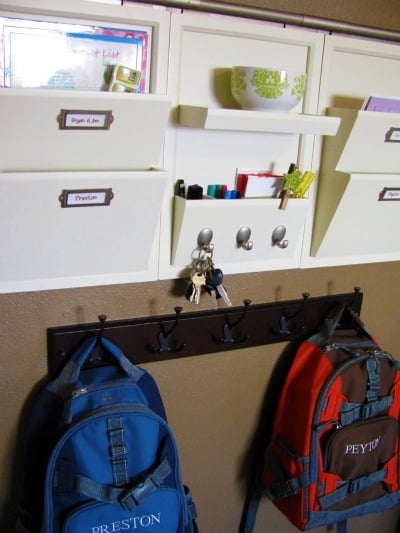
We use a memo station to stash kid’s papers that we get home throughout the week, along with all of our mail.

Sorting Station

Each Sunday I take a quick 10-15 minutes and recycle or file all the papers in each slot. We also have a dump basket with the same philosophy.

Dump Basket

Since piles can form so quickly, and as much as I believe in the “return things right where you found them” idea, it’s not always practical. Keeping one basket or bin dedicated to dumping our “stuff” each week, is easy to stash away when company comes, and is gone through at least once a week to return items to their home. This is also a great task for little ones looking for ways to become more helpful around the abode!

Jennifer is currently a stay at home mom, that not only cares for her own children {three uber beautiful little boys}, but also has the opportunity to spend her days with a couple other little ones as well, as a daycare mom. She is also currently working to start up an in-home organizing business, manage an organizing blog {where she talks about things like managing cleaning schedules and creating easy ways for kids to get organized} and working on expanding an Etsy shop as well.

Managing Your Time When It’s “Just You”

by Crystal on December 15, 2010

Guest post by Becky, a single woman from Washington State

If you’re only taking care of yourself, how can it be that you still cannot find enough hours in the day?

Value your time

It’s easy to over-commit to work, volunteer or social activities. After all, you don’t need to go home and take care of anyone else. But it’s still important to remember that you do have someone to take care of – you!

You need to eat healthy food, wear clean clothes, maintain your house, pay bills and so on. You may have more time to share than someone with additional family obligations, but nobody expects you to live in chaos because you have no time left to meet your own needs.

Figure out what motivates you

When you’re single, you don’t have to answer to anyone. That can be freeing, but it’s also a lot easier to waste time. Sometimes it can be motivating to have to answer to someone or be working together toward a goal or lifestyle.

When it’s just you, you could spend the entire weekend eating chips in your pajamas and nobody would know. Figure out a way to hold yourself accountable – setting personal deadlines for projects, creating a daily/weekly routine, sharing goals with friends or family; whatever works to keep you productive and using your time wisely.

Be creative

Tweak existing time management ideas to work for you:

A twist on “Freezer Cooking”

Cooking an entire new meal every night for one person isn’t a good use of my time and leads to wasted food. At the same time, I can only eat my favorite black bean soup so many times in a row.

I work to find recipes I like that freeze well and then freeze the leftovers in single-serve containers. These are great to take for lunch or to reheat on nights I get home late and don’t have time to cook.

I cook a couple times a week and then rotate through my leftover “meals” for variety — you can easily add a side salad or vegetable.

A twist on “When your child is napping”

Many articles on time management for moms talk about accomplishing small tasks when your child is napping or you’re waiting to pick up a child from an activity. You can apply the same concept to work.

Instead of chatting with co-workers, you can use your lunch hour or coffee break to pay bills, write a letter or e-mail or run to the grocery store. (Please note, I am not advocating that you multi-task and do these activities during your work hours.)

A twist on “Delegating tasks”

You don’t have a spouse or children you can ask to help you, but depending on your circumstances, you may be in a position to hire help.

I have a friend who works in a well-paying position (with long hours) that she loves. She’s happy to hire someone to do her deep cleaning a couple times a month.

If you’re currently single, we’d love to hear your tips and tricks for time management! Share them with us in the comments.

photo from Shutterstock

Update: We changed a few things and you should be able to save the edited form and re-open it. Sorry for the issues some of you were having!

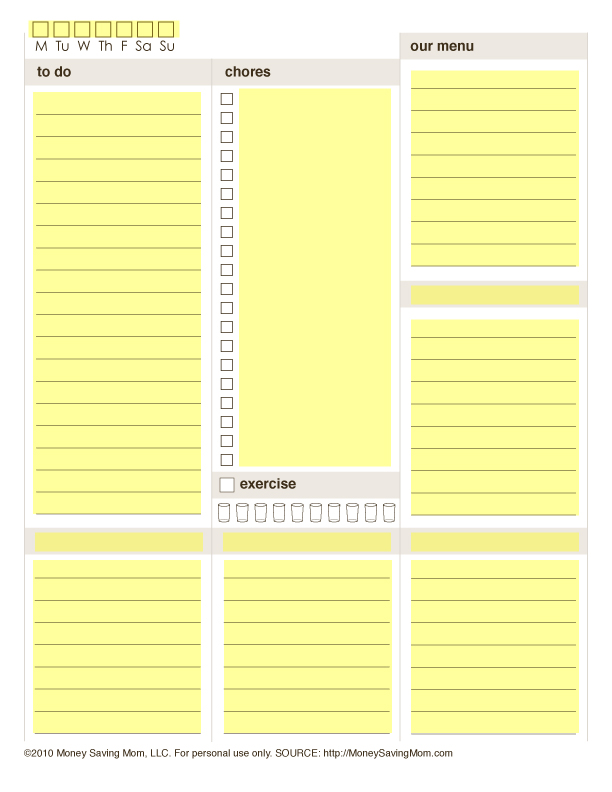
When I did the Time Management 101 series, many of you asked if there was any way I could make my Daily Docket customizable so that you could add your own chores and section headings to it.

Well, thanks to the help of Jessica from LifeAsMom.com and Joy from FiveJs.com, I’m excited to be offering a customizable Daily Docket — for free! The Customizable Daily Docket allows you to type in your information directly to the form and print it.

You can update the information and print as often as you’d like. Here’s how to customize the new Daily Docket:

1. Download the new Daily Docket here and open it in your PDF reader. (If you don’t have a PDF reader, you can download Adobe Acrobat for free here.)

The sections of the document highlighted in yellow in the image below can be customized with your own text. Please note that your document won’t be highlighted like the image; this graphic simply shows you the sections that are customizable.

2. Click on the section you’d like to fill in.

3. Type in your text.

4. Print out the document when you’re done typing in your text.

5. Save your document if you’d like to save your changes. You’ll be able to open the document again to add different text at any time.